
Song Finder Online
Browse a file or record live audio to get started.
Drag and drop or browse
MP3, WAV, FLAC, MP4, M4A, OGG
Live Audio Recording
Minimum Record 10 seconds of audio
Find Songs by Files, URL & live Audio - Online Tool
Identify songs from uploaded audio, recordings, or live input.
Upload an audio or video file, or record live audio directly in your browser to identify any song using our Song Finder tool. Even if the clip is noisy, remixed, or unclear, built-in audio enhancement tools help improve quality before recognition for better accuracy.
0
Audio analyzed
0
songs matched
in the last Month
Identify a SongHow does Song Recognition Tool work
Here are Three steps to song identifier.
Step 1
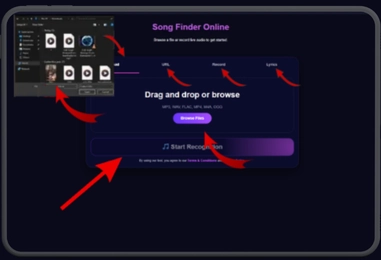
Start by uploading your audio file, dragging and dropping it into the tool, or pasting a URL. The SongFinder supports multiple input methods, making it easy to identify songs from different sources.
Step 2
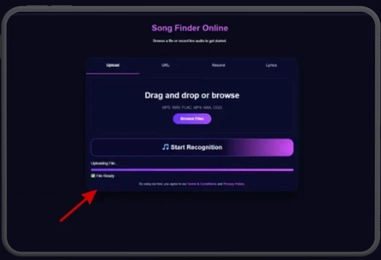
Once your audio is uploaded, click the Start Recognition button. The SongFinder will analyze the sound, compare it with its music database, and begin searching for matching tracks.
Step 3
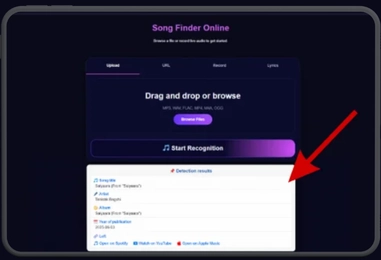
After the scan is complete, the SongFinder displays detailed results, including the song title, artist name, album information, and links to popular music platforms where you can listen to the track.
Song Finder Tools Features
Use our smart tools to find songs fast, easy, and accurately.
Fast Audio Recognition
Our advanced recognition engine quickly analyzes uploaded audio clips and identifies songs within seconds. The system is optimized for speed and accuracy, even when recordings are short or contain background noise. Users can instantly discover track information without waiting for lengthy processing. The browser-based technology eliminates the need for software installation. This creates a smooth and efficient song identification experience.
Support for Multiple Media Formats
Song Finder accepts a wide variety of audio and video formats, making music recognition simple for everyone. Users can upload MP3, WAV, MP4, M4A, and many other common file types. This flexibility ensures compatibility with recordings from phones, computers, and social media platforms. The system processes files directly in the browser for convenience. No additional conversion tools are required before uploading.
Accurate Music Identification
Using advanced audio fingerprinting technology, the platform compares recordings against a large music database. This process helps identify songs with a high level of accuracy, including older and less popular tracks. Even recordings with moderate noise can often be recognized successfully. The system continuously improves its matching capabilities. Users receive reliable results for a better music discovery experience.
Detailed Song Information
Once a song is identified, users receive comprehensive information about the track. Results may include the song title, artist name, album details, release year, and genre. Direct links to popular streaming services are also provided when available. This allows users to listen to the song immediately or explore similar music. The detailed information makes discovering and enjoying music easier than ever.
Work Smarter With Our Tools
Use the tools in the right way, and you’ll get faster and more accurate song matches. Each tool is made for a different kind of recording problem, and they can also work well together.

A Huge Music Library Helps Find More Songs
Our system searches through a very large collection of music from different years, genres, and countries.
It can often find:
- old songs from many decades ago
- regional or local music releases
- lesser-known album tracks
But no system is perfect.
Sometimes a song may not appear because it is:
- very new
- extremely local or independent
- not yet included in the database
If you get no result, don’t give up.
Try a different recording, use a clearer section of the song, or test one of the tool combinations below.

Start Simple for the Best Results
A plain, unedited audio clip is often the most accurate choice.
Why?
Every editing tool changes the sound slightly. If you apply many effects without a clear reason, the song may become harder to recognize instead of easier.
Best approach:
- Upload the original clip first.No extra processing, just the raw recording.
- Only use additional tools if the first try fails.For example, remove noise, adjust volume, or isolate vocals only when needed.
Think of it like this: the closer the audio is to the real song, the easier it is to match.

Choose the Right Part of the Song
Not every section of a track is equally useful for identification.
Parts that often cause problems:
- long intros
- drum-only sections
- buildups
- fade-outs or endings
Many songs sound similar in those moments, so the tool may return the wrong match or no match at all.
The best section to use is usually:
- the chorus
- the main melody
- the most recognizable vocal or instrumental part
A short, clear, distinctive clip usually works better than a long recording with lots of noise.

Quick Tips for Better Matches
- Use a clear recording with less background noise.
- Keep the clip focused on the music, not conversation.
- Try 10–20 seconds of the most recognizable part.
- If one attempt fails, try a different section of the song.
- Use extra tools only when they solve a specific problem.
A Simple Workflow
- Upload the raw clip first.
- If it fails, clean the audio(remove noise or isolate vocals).
- Try again with the improved clip.
- Use the chorus or strongest melody for the final attempt.
Following this order gives you the best chance of finding the correct song quickly.
Use cases of our tools
Common Use Cases and How to Use Each Tool.
Find a Song From a Recording
submit a recording containing the music you want to identify
the tool extracts unique audio fingerprints from the recording
compare the fingerprint against millions of known songs
Identify a Song From Humming
record yourself humming or singing the melody you remember
the tool analyzes pitch patterns and musical structure
Find a Song From Lyrics
type the words or phrases you remember from the song
scan song catalogs for matching lyric combinations
Identify Music in Videos
submit a video containing background music or soundtrack audio
the music track is isolated and prepared for recognition
the extracted audio is matched against known tracks
Discover Unknown Music
record music playing in a store, cafe, event, or public place
identify the track using advanced audio matching technology
Frequently Asked Questions
Conclusion
Song Finder makes music identification fast, simple, and accessible for everyone. Whether you upload an audio file, analyze a video, use a URL, or record live audio, the tool helps you discover song details within seconds. With support for multiple formats, advanced audio recognition technology, and a large music database, users can identify both popular and hard-to-find tracks with ease.
The platform also provides useful information such as artist names, album details, genres, and links for a complete music discovery experience. By following the recommended tips and workflows, you can improve recognition accuracy and find songs more effectively. Song Finder is a reliable solution for music lovers, content creators, and anyone who wants to identify unknown songs quickly and accurately.